


Lambda Web Functions is a great fit for remote MCP servers: the MCP SDK’s own Node.js server runs as it is, responses stream, and you pay little while tools wait. I built an example you can deploy from Serverless Land, with an IAM-protected backend doing the tool’s work.
The shape of an MCP server
Most MCP servers I use run on my laptop. My AI client starts each one and talks to it directly. That works well for me, but every copy has to be installed, updated and given credentials by hand, and it’s hard to share with a teammate, a hosted agent or a CI job that wants the same tools.
A remote MCP server can use the Streamable HTTP transport. The client sends each JSON-RPC message, such as tools/list or tools/call, as an HTTP POST to one endpoint, usually /mcp. The server answers with plain JSON, or with a text/event-stream response when it has other information to share before the result, such as progress updates.
Web Functions makes this easy, as it supports standard HTTP servers with requests that can run for up to 15 minutes while a tool works, some streaming, bursts when an agent makes several tool calls at once, and long idle stretches. I’ve run MCP servers in Lambda Event Functions behind an adapter. That worked, but I had to add a translation layer between the MCP SDK and the request. I’ve also run them in containers, where I had to look after a load balancer and pay for idle tasks overnight. Web Functions sit between the two.
Why Web Functions fit MCP
- Your server is the MCP SDK’s server. A Web Function runs whatever listens on the port in
AWS_LAMBDA_HTTP_ENDPOINT. The MCP TypeScript SDK ships a Node.js HTTP handler, so the code on my laptop is the code in Lambda. - Streaming needs no configuration. When the SDK switches a response to Server-Sent Events, each event reaches the client as it’s written.
- One environment serves many requests. Each execution environment handles concurrent requests like any web server, 64 by default, up to 128. Parallel tool calls from an agent usually land in a warm environment.
- Waiting is cheap. Web Functions bill for requests, active CPU time, memory over each environment’s life, and data transfer. Most useful MCP tools spend their time waiting on an API, a database or a model, and waiting uses little CPU.
- Each endpoint has its own auth. An endpoint uses
ApplicationManagedauth, where your code decides, orIamAuth, where Lambda checks a SigV4 signature before your code runs.
Deploy the example
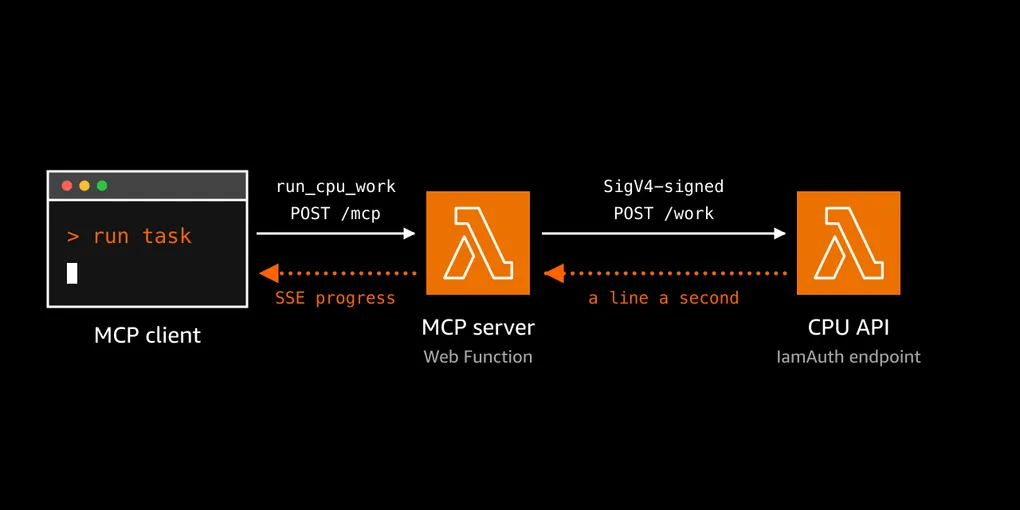
You, or your AI assistant, can deploy the example by following the instructions in its README. It deploys two Web Functions as one unit: an MCP server with two tools, and a CPU API that does the work behind one of them. get_current_time runs as a tool in the MCP server. run_cpu_work calls the CPU API, which hashes with SHA-256 for 1 to 20 seconds and streams a line every second. The CPU API has no MCP code. It stands in for a service you already run, and its endpoint uses IamAuth.
I kept the tools simple on purpose so you can swap in your own. They need no other AWS services, so you can deploy in a couple of minutes and understand how it fits together.
Tools, and a fresh server per request
When you swap in your own API, the tool is the part you write. Its name, description and input schema are all the model sees of your service. A buildServer() function creates an McpServer and registers each tool with a Zod schema:
function buildServer() {
  const server = new McpServer({ name: 'lambda-web-mcp-server', version: '1.0.0' });

  server.registerTool(
    'get_current_time',
    {
      description: 'Get the current date and time, optionally in a given IANA ' +
        'time zone (for example Europe/London).',
      inputSchema: z.object({
        timeZone: z.string().optional().describe('IANA time zone name. Defaults to UTC.'),
      }),
    },
    async ({ timeZone = 'UTC' }) => {
      // ...format the time, or return { isError: true, ... } for an unknown zone
      return {
        content: [{ type: 'text', text: JSON.stringify(result) }],
        structuredContent: result,
      };
    },
  );
  return server;
}

const handleMcp = toNodeHandler(createMcpHandler(buildServer));
Clients read each tool’s name, description and JSON Schema through tools/list, and the model picks a tool from that description, so I write it like API docs. A tool returns text content for the model and the same result as structuredContent for client code. When something goes wrong, such as an unknown time zone, the tool returns isError: true. The model sees that as a result it can act on, for example by fixing the input and trying again, rather than as a failed call.
With Web Functions, one environment serves many clients at once, and a client’s next request can land on a different environment. createMcpHandler calls buildServer() for every request, so requests don’t share anything. If your tools need to keep anything between calls, store it externally from the function in a data store.
Calling an IAM-protected API with SigV4
Plenty of teams have internal HTTP services they’d like agents to use, without making those services public or handing out API keys.
Lambda only forwards a request from the MCP server function to the CPU API function’s endpoint when it’s SigV4-signed by a principal with lambda:InvokeWebFunctionEndpoint on that endpoint. The MCP server’s execution role has that permission on that one endpoint ARN, plus its own logs. There’s no SDK client for invoking an endpoint, so the MCP server signs a normal HTTPS request with the service name lambda:
const signer = new SignatureV4({
  service: 'lambda', region: AWS_REGION, credentials: defaultProvider(), sha256: Sha256,
});

const signed = await signer.sign({
  method: 'POST', protocol: url.protocol, hostname: url.hostname, path: url.pathname,
  headers: {
    'content-type': 'application/json',
    host: url.hostname,
    'x-amz-content-sha256': crypto.createHash('sha256').update(body).digest('hex'),
  },
  body,
});
return fetch(url, { method: 'POST', headers: signed.headers, body, signal });
The endpoint returns 403 without the X-Amz-Content-SHA256 header. After checking the signature, Lambda removes the Authorization header, so the CPU API has no auth code and never sees credentials. A MultiRegion endpoint needs SigV4a instead. Bundle the AWS SDK packages you use, because the Web Function runtime leaves the AWS SDK out.
This keeps the CPU API private. It has an HTTPS endpoint like any Web Function, but only the MCP server’s role can call it, and an unsigned curl gets 403. No shared secret exists anywhere to store, rotate or leak.
Streaming progress, and cancelling it
While it works, the CPU API sends one line of JSON every second, then a final result line. The MCP server reads each line as it arrives and passes it on to the client as an MCP progress notification:
for await (const msg of readNdjson(res.body)) {
  if (msg.type === 'progress' && progressToken !== undefined) {
    await ctx.mcpReq.notify({
      method: 'notifications/progress',
      params: { progressToken, progress: msg.second, total: msg.total,
                message: `${msg.second} of ${msg.total} s: ` +
                  `${msg.hashes.toLocaleString('en-US')} hashes` },
    });
  } else if (msg.type === 'result') {
    backend = msg;
  }
}
The client asks for progress updates by sending a progressToken with the tool call. The response then comes back as an SSE stream: one event per update, then the tool result. Web Functions stream both connections with no extra settings.
Cancelling works in the other direction. If the client cancels the call, the MCP server closes its connection to the CPU API, and the CPU API stops hashing when it sees the connection close. You don’t keep paying for work nobody is waiting for.
Why the work runs in its own function
Node.js runs your JavaScript on a single thread. If the MCP server did the hashing itself, that thread would be busy for the whole job, and every other request sharing the environment, even a quick get_current_time, would wait behind it. Moving the CPU work into its own function keeps the MCP server free: ask for 15 seconds of CPU work and the time in London together, and get_current_time answers straight away. The CPU API has the same single thread, so it hashes in 50 ms slices and yields between them to keep its own concurrent requests moving.
Splitting the work also means each function scales on its own, and you pay for CPU where the work runs. When testing, two run_cpu_work calls ran for 9 seconds between them. The MCP server’s connections were open for all of that time, but the platform.invokeSummary log records showed it used only 400 ms of CPU, and that covers 7 requests including those two. The CPU API, which spent the whole time hashing, used 11,049 ms. The MCP server was mostly waiting and relaying, and waiting barely counts as active CPU.
Trying it
The same code runs locally. Run npm start in the cpu-api folder, and npm install then npm start in the mcp-server folder, each in its own terminal. Without AWS_LAMBDA_HTTP_ENDPOINT, the MCP server binds to 127.0.0.1, turns on the SDK’s DNS-rebinding guards, and calls the CPU API unsigned over http. npm run inspect opens the MCP Inspector.
To deploy, the README uses aws lambda-web deploy for both functions with a shared $STACK name prefix. It switches the CPU API endpoint to IamAuth and creates the scoped role. Then add the /mcp URL to Kiro’s mcp.json, or run claude mcp add --transport http, and ask your agent to “run two 5-second CPU jobs at the same time and compare the results.”
Things to consider when you build this
- Add authentication to the MCP endpoint. As deployed it uses
ApplicationManagedauth and is public, so anyone with the URL can run CPU work you pay for. Implement the MCP authorization spec in the server, or useIamAuthif your clients can sign requests. - Custom domains go through CloudFront. Put a CloudFront distribution in front of the endpoint to use your own domain. You can then also attach AWS WAF to the distribution to protect your endpoint. With origin access control (OAC), the MCP server’s endpoint can use
IamAuthtoo. CloudFront signs each request with SigV4, in the same way the MCP server signs its calls to the CPU API, so the endpoint’s own URL returns403and every request has to come through CloudFront. OAC protects the endpoint, not the tools, so you still need the authentication above to control who calls them. - Make the MCP server’s timeout longer than its backend’s (120 against 60 seconds here), so slowness shows up as a tool error.
- Some clients only show the final result. The Inspector and
curl -Nshow the progress stream.
Where this pattern fits
If your MCP server mostly calls other services, gets bursty agent traffic and sits idle a lot, a Web Function suits it well: standard SDK code, streaming built in, many requests per environment, and little CPU billed while tools wait. If you have internal APIs you’d like agents to use, the IamAuth and SigV4 half gives you that with no shared secret. If your server needs long-lived connections or in-memory sessions per client, a container service such as ECS on Fargate is the better match.
Deploy the example and swap run_cpu_work for a call to one of your own APIs. More background is in the Web Functions docs and Exploring AWS Lambda Web Functions.
Would love to hear which tools you put behind it.