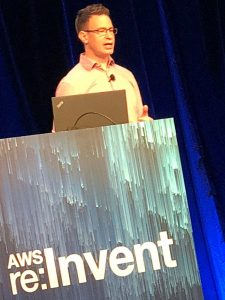
 Benjamin Thurgood from AWS
Cloud is awesome, you can scale your web app or site on demand! But where do you start when you’re planning for bi g numbers of users. Making some design choices up front can dramatically simplify your life later.
Benjamin showed how best to link together different AWS services and using the capabilities of the AWS platform.
Autoscaling is only the beginning, there’s a lot more to look at.
Use Native Sevices
First step is to use the AWS Global Infrastructure with Edge locations. Take advantage of the global AWS platfom so you don’t have to reinvent the wheel.
Many native features available like Cloudfront, S3, DynamoDB, EFS etc.
EC2, EBS, RDS etc are scalable but you need to work a little harder.
Lightsail is an easy way to get started as a developer.
You can scale up but you’ll reach an end some time.
Read more…

Many companies trying to take advantage of cloud computing are embracing the moniker of the “Software Defined Data Center” as one way to understand and communicate the benefits of moving towards an infrastructure resource utility model. VMware has taken on the term SDDC to mean doing everything in your data center with software and not requiring any custom hardware. Other companies sell “software-defined” products which do require particular hardware for various reasons but the functionality can be programmatically controlled and requested all in software. Whether your definition of “software-defined” mandates hardware or not the general premise (nothing to do with premises!) is being able to deliver and scale IT resources programmatically.
 This is great but I think SDDC is just a stepping stone to what we are really trying to achieve which is the “Policy Defined Data Center”.
Once you can deliver IT resources in software, the next step is ensuring those IT resources are following your business rules and processes, what you would probably call business intelligence policy enforcement. These are the things that your business asks of IT partly for regulatory reasons like data retention and storing credit cards securely but also encompasses a huge amount of what you do in IT.
Here are a few examples of what kinds of policies may you have:
- Users need to change their passwords every 30 days.
- Local admin access to servers is strictly controlled by AD groups.
- Developers cannot have access to production systems.
- You can only RDP to servers over a management connection.
- Critical services need to be replicated to a DR site, some synchronously, others not.
- Production servers need to get priority over test and development servers.
- Web server connections need to be secured with SSL.
- SQL Server storage needs to have higher priority over say print servers.
- Oracle VMs need to run on particular hosts for licensing considerations.
- Load balanced web servers need to sit in different blade chassis in different racks.
- Your trading application needs to have maximum x latency and minimum y IOPS
- Your widget application needs to be recoverable within an hour and no be more than 2 hours out of date.
- Your credit card database storage needs to be encrypted
- All production servers need to be backed up, some need to be kept for 7 years.
Read more…

 I have the pleasure today of presenting at the first ever UK VMware User Group. This is a combined meeting of the London, Northern and Scottish VMUGs in the cool National Motorcycle Museum in Solihull which is apparently the “finest and largest motorcycle museum in the world”!
My presentation has nothing whatsoever to do with motorcycles unfortunately but is rather about upgrading your virtual infrastructure from vSphere 4 to 5. In hindsight I should have taken some more inspiration from the surroundings and somehow worked a motorcycle angle into my presentation, I should plan more carefully in the future!
Upgrading to vSphere 5 doesn’t actually have to be a particularly complicated procedure if you have all your ducks in a row and understand all the pre-requisites. This is a good thing as it means you can take advantage of all the cool new features without necessarily having to drastically re-architect your vSphere 4 environment but also means some of the old issues like vCenter availability haven’t changed.
Read more…
This post is the last in the series: Designing a Virtual Infrastructure that Scales.
 I hope I’ve managed to give you some information on what you need to be considering when scaling your virtual environment but this series isn’t actually about giving you all the answers but rather to help you think about the questions you need to be asking to make sure you are getting the answers specific to your environment.
So, in summary:
- Keep it simple!
- Engage everyone
- Do your research
- Do thorough planning
- Think big
- Think ahead
- Start small
- Create modular building blocks
- Make it the same everywhere
This all started as a presentation at the London VMware User Group meeting, #LonVMUG where I talked about some of the things you should be thinking about when scaling your virtual infrastructure.
Here are the links to all the posts:
Part 1, Taking Stock
Part 2, Speak to the People
Part 3, Scaling for VDI
Part 4, Designing Thinking
Part 5, So, after all that…
This post is the fourth in the series: Designing a Virtual Infrastructure that Scales.
In Part 3, Scaling for VDI, I went through some of the considerations specific to VDI and talked about how big your environment can get if you decide to go VDI.
 In this post it’s time to talk about actual infrastructure design and start thinking and planning for how to handle scale.
In Part 1, Taking Stock, I talked about how the virtual hosting environment you built a few years ago may be starting to get a little unwieldy to manage. I suggested: “Now is the time to pause if you can and take stock. Have a good look at your current environment and then zoom out and look at the big picture to plan the next stage of your virtual infrastructure because if you don’t you may find it running away from you.”
Hopefully by now you have an idea of what you actually need to virtualise. You’ve identified the number of servers and workstations, what resources they will require, who is going to be accesssing them, from where and at what times. You should know which VMs require business recovery and to where. You have done some calculations on how many hosts you will need to host your VMs and planned failover capacity for HA and DRS. You have an idea of VM network requirements, storage space and IOPS required.
Now is the time to use all that information gathering and see how you can build an infrastructure to run it all.
Read more…
This post is the third in the series: Designing a Virtual Infrastructure that Scales.
In Part 2, Speak to the people, I went through some communication ideas to involve more people in the information gathering stage to ultimately be able to put together a better infrastructure
 In this post I’m tackling the things you need to be thinking about when you consider VDI.
So…VDI, the promised solution to all your IT needs. No PCs on desks, thin clients, zero clients, happy clients, automated provisioning, stateless VMs, thin apps, streaming.
VDI is certainly a very different way of delivering IT to clients, it can be seen as terminal services on steroids, using some of the benefits of shared resources but allowing separation when you need it.
Why is VDI any different from just having VM workstations which people connect to?
Read more…
This post is the second in the series: Designing a Virtual Infrastructure that Scales.
In Part 1, Taking Stock, I talked about looking at your current environment and seeing where you need to get to by doing a bit of crystal ball future capacity planning combined with understanding your current infrastructure limitations.

In this post I’m going to talk about something that isn’t done enough in infrastructure projects and that’s actually talking to real life people.
Many enterprise IT departments are pretty big places aften spread across the globe working in different timezones in multiple separate vertical silos. You quite possibly may not have met everyone in your own team let alone know what everybody else does in your office.
If you’re going to think about an infrastructure change to support a much bigger virtual environment, isn’t it worth looking at the really super-duper-bigger picture. Unless you know anything and everything (and there are some of you that may do!) you really should be getting other people involved from the very beginning to see if they would like to jump on the bandwagon and make changes to their environment for the greater good.
Read more…
I recently had the privilege of presenting at the London VMware User Group meeting, #LonVMUG where I talked about some of the things you should be thinking about when scaling your virtual infrastructure.
I’ve turned part of the presentation into a series of posts, going through some of the aspects you should be considering when your virtual environment demands bigger, better, faster, more!
Part 1, Taking Stock
Part 2, Speak to the People
Part 3, Scaling for VDI
Part 4, Designing Thinking
Part 5, So, after all that…
Designing a Virtual Infrastructure that Scales: Part 1, Taking Stock
Read more…


Recent Comments